
Google Antigravity has a free tier for personal Google Accounts with a weekly quota. Paid Google AI Pro and Google AI Ultra plans refresh their quota every five hours and can use AI credits for overages. Google's plans page lists Google AI Pro at $19.99 a month and Google AI Ultra from $99.99 a month. With a Google Cloud project, you can instead choose Pay As You Go and pay API pricing for every request, with no Gemini Enterprise licence. Teams on Gemini Enterprise can use Pay-as-you-go billing, or Standard and Plus seats with $10/month and $15/month of pooled seat credits.
Google Antigravity plans and pricing at a glance
Individual accounts use Antigravity under terms derived from Google's Terms of Service. Teams use it under Google Cloud terms through Gemini Enterprise.
| Plan or tier | Account or billing type | Quota and rate limits | Overages and billing |
|---|---|---|---|
| Free (no Pro or Ultra plan) | Personal Google Account | Meaningful quota refreshed weekly, with a weekly rate limit | No AI credit overages |
| Google AI Pro | Personal Google Account | High quota refreshed every five hours until the weekly limit is reached, higher weekly rate limit | Optional AI credits at standard Gemini Enterprise consumption pricing |
| Google AI Ultra | Personal Google Account | Highest quota refreshed every five hours, highest weekly rate limits | Optional AI credits at standard Gemini Enterprise consumption pricing |
| Pay As You Go | Google Cloud project with an active Cloud Billing account | No included quotas | API pricing for every request at Agent Platform generative AI pricing |
| Gemini Enterprise Standard | Seat licence | Included first-party quotas, $10/month pooled seat credits | Managed overages, token billing for Claude models |
| Gemini Enterprise Plus | Seat licence | Included first-party quotas, $15/month pooled seat credits | Managed overages, token billing for Claude models |
| Gemini Enterprise Pay-as-you-go | No seat licence, eligible Cloud Billing account | Not given | Usage billed to the Cloud Billing account |
What every plan includes, and what none of them offer:
- Every plan includes Gemini models such as Gemini 3.8 Flash as the core agent model.
- Every plan includes unlimited Tab completions and all product features, such as scheduled tasks and the CLI.
- Antigravity does not support bring-your-own-key or bring-your-own-endpoint for extra rate limits.
- Antigravity does not offer organisational tiers through a custom contract.
Personal Free, Google AI Pro and Google AI Ultra plans
Google Workspace plans do not include Antigravity plans or higher rate limits. Google AI Ultra comes as Google AI Ultra 5x and Google AI Ultra 20x.
- Accounts without Pro or Ultra get a meaningful quota, refreshed weekly.
- Google AI Pro refreshes its quota every five hours until the weekly limit is reached.
- Google's plan comparison lists Antigravity agent requests as Limited on Google AI Plus, Expanded on Pro, Higher on Ultra 5x and Highest on Ultra 20x.
- Google AI Pro and Google AI Ultra both include Dynamic Workflows.
- Remote Agents are available to Google AI Pro and Google AI Ultra subscribers with a personal Google Account.
- Google AI Pro includes Orchestrator (Argon) on paid plans, or on trials with eligible premium devices.
- Google AI Ultra gives the highest five-hour quota, the highest weekly rate limits and access to third-party models.
- Google AI Ultra includes both Orchestrator (Carbon) and Orchestrator (Argon).
- The
/boost,/swarmand/teamworkcommands require a paid plan.
How Antigravity baseline rate limits and quota usage work
Baseline rate limits mainly depend on available capacity and are there to prevent abuse. Google may change them to manage capacity and stability. They track the work the agent does rather than a fixed number of prompts. Quick tasks therefore give you more prompts, and complex tasks use up more quota.
Checking quota usage in the App and Antigravity CLI
To check your usage, open View Usage in the model selector under the prompt box. It shows Weekly Limit Remaining and Five Hour Limit Remaining for Gemini Models and for Claude and GPT models. The Settings page also shows baseline quota usage by model.
In the Antigravity CLI, the /usage slash command displays current model credit consumption and quota limits.
AI credits and overage billing on Pro and Ultra
Users on Google AI Pro or Ultra can use purchased AI credits, or promotional credits, for usage above the baseline quota. Credits are billed at standard Gemini Enterprise consumption pricing. In the Antigravity CLI, the Use AI Credits setting lets the CLI spend your AI credits after your plan's quota runs out. It is off by default.
The AI Credit Overages setting on the Settings page controls what happens when a model's baseline quota runs out:
AI Credit Overages | Behaviour when baseline quota is exhausted |
|---|---|
Never | Never spends credits automatically, and waits for the baseline quota to refresh |
Always | Spends AI credits until the baseline quota refreshes, then switches back |
Model availability across Antigravity plans
The Models page lists which reasoning models each plan can use. You pick a model from the selector under the prompt box.
| Model | Free & Plus | Pro | Ultra | Enterprise |
|---|---|---|---|---|
| Gemini 4 Carbon | No | No | Yes | Yes |
| Gemini 4 Argon | No | Paid plan or eligible trial | Yes | Yes |
| Gemini 4 Hydrogen | No | Non-trial only | Yes | Yes |
| Orchestrator (Carbon) | No | No | Yes | No |
| Orchestrator (Argon) | No | Paid plan or eligible trial | Yes | No |
| Gemini 3.8 Flash | Yes | Yes | Yes | Yes |
| Gemini 3.7 Flash, Gemini 3.6 Flash | No | No | No | Yes |
| Gemini 3.1 Pro | No | No | No | Yes |
| Claude Sonnet 5.5 (thinking), Claude Opus 5.5 (thinking) | No | Non-trial only | Yes | With admin opt-in |
Orchestrator, chosen in the model selector or with /model in the CLI, pairs a Gemini 4 Carbon or Gemini 4 Argon planner with Gemini 4 Hydrogen. The planner explores, plans and reviews progress, and Gemini 4 Hydrogen makes the edits and runs builds and tests.
Two more model rules:
- To move from a Google AI Pro trial to a paid Pro plan, which the Claude Sonnet 5.5 and Claude Opus 5.5 models need, you submit a request.
- Antigravity uses Nano Banana 2, which you cannot change, to generate images such as UI mockups and architecture diagrams.
Gemini Enterprise pricing, seat credits and Google Cloud billing
Gemini Enterprise runs every Antigravity session under Google Cloud's enterprise security controls, data residency guarantees and the Google Cloud Terms of Service. It supports the Antigravity App, the Antigravity CLI (agy) and IDE extensions for Visual Studio Code, Visual Studio, JetBrains, Zed, Xcode and Eclipse, with Eclipse in Preview. The standalone Antigravity IDE is not supported for enterprise deployments. Legacy Gemini Code Assist extensions support only first-party Gemini models.
How organisations connect and pay:
- Gemini Enterprise Pay-as-you-go needs no seat licence and bills usage to an eligible Cloud Billing account.
- A Gemini Enterprise Standard or Plus seat licence includes first-party quotas, managed overages and admin controls.
- A seat licence needs no separate per-user Antigravity licence.
- First-party Gemini models are on by default and draw from pooled seat credits of $10/month on Standard and $15/month on Plus.
- Third-party Claude models need an administrator to opt in and are billed by token consumption.
Background models, thinking levels and token charges
You can use Anthropic Claude Opus 5.5 or Claude Sonnet 5.5 for the main reasoning work. Lightweight first-party Gemini models still run in the background for tasks such as context management and summaries, and these can incur charges.
On Enterprise, Claude Opus 5.5 and Claude Sonnet 5.5 have four thinking levels: low, medium (the default), high and max. In the App and IDE extensions, each level is a separate entry under Other Models, such as Claude Opus 5.5 (High). In agy, put the level in the model ID with --model, for example claude-opus-5-5-high. You can also set the level with --effort, or with /effort mid-session, which needs agy v1.2.11 or later.
Before buying Gemini Enterprise licences
An administrator must enable aiplatform.googleapis.com in the Google Cloud Console first. Wait about five minutes for it to take effect before completing licence purchases.
- Administrators need the
roles/discoveryengine.agentspaceAdminrole. - Everyone who uses Antigravity, administrators included, needs the
roles/discoveryengine.agentspaceUserrole. - The available locations are
global,usandeu, and image generation works only onglobalendpoints.
For agy flags, settings and permission rules, see Antigravity CLI (agy): settings and allow all permissions. For how Antigravity's apps and CLI compare with Anthropic's agent, see Google Antigravity vs Claude Code: what's the difference.
Pay As You Go billing with a Google Cloud project
With the Pay As You Go billing model, Antigravity sends requests to Gemini Enterprise Agent Platform in your own Google Cloud project. It needs Antigravity App v2.31.0 or later, or Antigravity CLI v1.4.11 or later, and no Gemini Enterprise licence. You sign in with a Google Account that has access to the project, such as a Google Workspace account. You pay API pricing for every request instead of a flat subscription, and there are no included quotas. Claude models appear only if you enable them in Model Garden for your project.
- A project owner or admin links the project to an active Cloud Billing account and enables
aiplatform.googleapis.com. - Each developer needs the Agent Platform User role,
roles/aiplatform.user, or another role with theaiplatform.endpoints.predictpermission. - In the App or CLI, choose the Google Cloud sign-in,
Continue with Google CloudandPay As You Go, then enter your project ID and region.
Watch Google Antigravity conversations on a keypad or phone with Orbtile
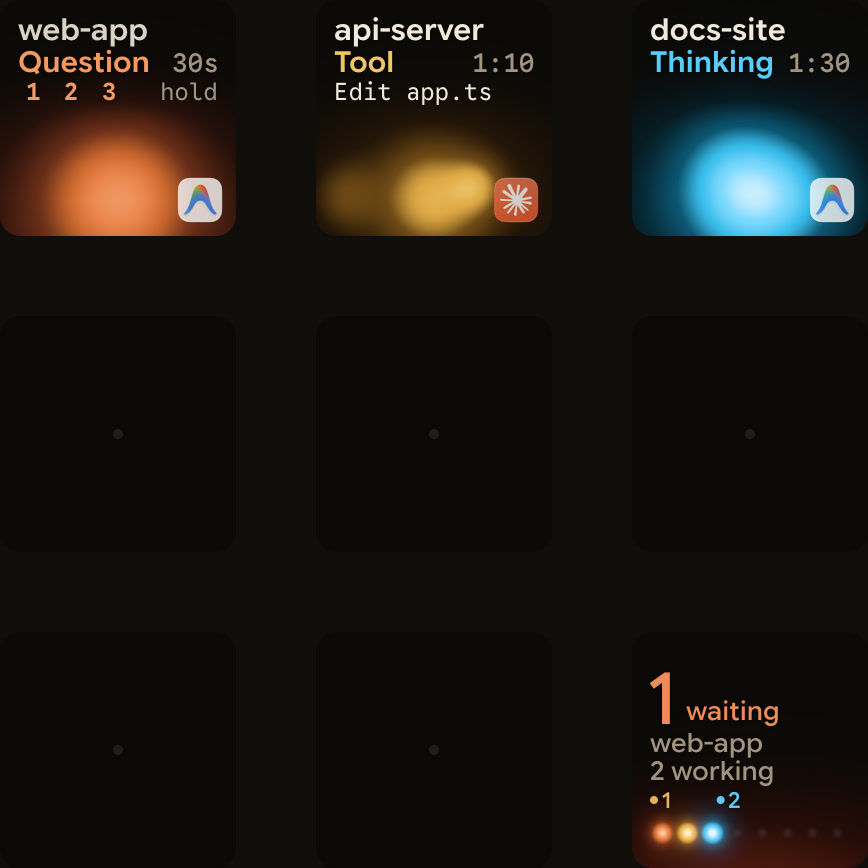
Orbtile shows your agent sessions on a Logitech MX Creative Keypad, an iPhone or an Android phone. It drives the keypad's nine LCD keys and two page buttons directly over USB, without Logi Options+ or an account. Phones use Orbtile Mobile, on iOS 17 or later or Android 8.0 or later. Orbtile runs on a computer with macOS 14.0 Sonoma or later on Apple silicon, or Windows 11 (x64).
- Each Antigravity desktop app conversation gets its own key with its title and state.
- From Orbtile 0.2.10, replies also appear as live typewriter text.
- Antigravity uses an azure blue working palette.
- From Orbtile 0.3.4, Antigravity's waiting states use the shared terracotta alarm colour.
- Waiting conversations move to the front, and a tap on key 9 focuses the first waiting one.
- To answer a question with numbered options, hold its key, pick options on keys 1, 2, 3 and 7, then hold Send on key 9.
- This works for up to four questions with two to four choices each, and
Sentmeans Antigravity acknowledged the reply. - Written answers and permission prompts stay on your computer.
- Antigravity IDE and CLI sessions do not appear automatically.
- A CLI hook script can report each Antigravity CLI session to Orbtile's local Adapter API.
- The same pad also shows Claude Code, Codex, ZCode and Kimi Code sessions.
To set up alerts for waiting agents, see Antigravity notifications: CLI alerts and waiting agents. To report CLI sessions yourself, see Show any script or agent on a keypad with the Orbtile Adapter API.
FAQ
How much does Google Antigravity cost for individual developers?
Google Antigravity has a free tier for personal Google Accounts, with a meaningful quota that refreshes weekly. Paid Google AI Pro and Google AI Ultra plans refresh their quota every five hours and have higher weekly rate limits. Google's plans page lists Google AI Pro at 19.99 USD a month and Google AI Ultra from 99.99 USD a month. With a Google Cloud project, Pay As You Go charges API pricing for every request instead of a flat subscription.
How do Google Antigravity rate limits and AI credit overages work?
Baseline rate limits track the work the agent does rather than a fixed number of prompts, so simple tasks allow more prompts. On Google AI Pro and Google AI Ultra, purchased or promotional AI credits cover usage above the baseline quota at standard Gemini Enterprise consumption pricing. The AI Credit Overages setting on the Settings page decides whether they are used, with a choice of Never or Always.
How is Google Antigravity priced in Gemini Enterprise?
Gemini Enterprise Pay-as-you-go has no seat licence and bills usage to an eligible Cloud Billing account. Standard and Plus seat licences need no separate per-user Antigravity licence. First-party Gemini models draw from pooled seat credits of 10 USD per month on Standard and 15 USD per month on Plus. Claude models need administrator opt-in and are billed by token consumption.
Does Orbtile show Google Antigravity sessions on a keypad or phone?
Yes. Orbtile follows conversations in the Antigravity desktop app and shows each one's title, state and live response text. You see them on a Logitech MX Creative Keypad, an iPhone or an Android phone, and Orbtile runs on macOS 14 or later on Apple silicon or Windows 11 x64. From the keypad you can answer up to four multiple-choice questions with two to four options each. Permission requests and written answers stay on your computer. Antigravity CLI and IDE sessions do not appear automatically, though a CLI hook script can report CLI sessions to Orbtile's local Adapter API.