
The Antigravity App is Google's desktop command centre for running several local agents in parallel. The Antigravity IDE is a fully featured agentic IDE with the agent in a side panel and inline diffs. The Antigravity CLI (agy) runs agents in the terminal. Orbtile shows Antigravity desktop app conversations on a keypad or phone, not the IDE or CLI.
| Antigravity App | Antigravity IDE | Antigravity CLI (agy) | |
|---|---|---|---|
| Primary role | Desktop command centre for parallel local agents | Fully featured agentic IDE | Terminal client for coding agents |
| Where the agent runs | Project conversations, with a conversation picker and command palette | The Agent side panel beside your files | Your terminal |
| Parallel work | Several local agents across Projects | Implementation plans, inline diffs and multi-step tasks in your editor | Background subagents, with shell commands |
| Best for | Orchestrating agents, scheduled messages and browser tasks | Editing code with plan review and diffs | Terminal sessions and shell commands |
| Orbtile support | Yes, conversations show on the keypad or phone | No, IDE sessions do not appear automatically | No, CLI sessions do not appear automatically |
Antigravity App and Antigravity IDE side by side
Google Antigravity is Google's agentic development platform. It comes as the Antigravity App (v2.5+), the Antigravity CLI (agy, v1.2+), For IDEs editor extensions, the standalone Antigravity IDE and the Python Antigravity SDK. The App and the standalone IDE are separate desktop downloads, built around different workflows.
| Feature | Antigravity App | Standalone Antigravity IDE |
|---|---|---|
| Primary role | Desktop command centre for parallel local agents | Fully featured agentic IDE with the agent manager, artifacts and a deep understanding of your codebase |
| Workspace unit | Projects grouping one or more local Git repositories or folders | Your workspace folder, repository or solution |
| Where the agent runs | Project conversations, with a conversation picker and command palette | Right-hand Agent side panel (Toggle Agent) |
| Git isolation at launch | Local mode, or New worktree mode in an isolated Git worktree | Works in the workspace folder, repository or solution you open |
| Focus prompt shortcut | Cmd+L (macOS), Ctrl+L (Windows and Linux) | Cmd+L (macOS), Ctrl+L (Windows and Linux), which also adds the selected or current lines as context |
| New conversation shortcut | Cmd+N (macOS), Ctrl+N (Windows and Linux) | Cmd+Shift+L (macOS), Ctrl+Shift+L (Windows and Linux) |
| Task automation and review | Slash commands: /goal, /grill-me, /schedule, /browser, /plugin | Interactive implementation plans, granular inline diffs and multi-step tasks |
| Operating systems | macOS 13 (Ventura)+, Windows 10 (64-bit) or 11, Linux (glibc >= 2.28, glibcxx >= 3.4.25), Googlebook OS | macOS 12 (Monterey)+, Windows 10 (64-bit)+, Linux or Googlebook (glibc >= 2.28, glibcxx >= 3.4.25) |
Alongside these desktop apps, the Antigravity CLI (agy, v1.2+) is a terminal client. With it you run autonomous coding agents, execute shell commands and manage background subagents. The Antigravity SDK (google-antigravity on Python 3.10+) lets developers prototype custom agents on the Antigravity agent harness. It supports declarative tool execution policies and evaluations.
For a full walkthrough of every surface, plus rules, permissions, MCP servers and hooks, see Google Antigravity: App, IDE, CLI, setup and agent workflows.
How the Antigravity App works: Projects, worktrees and parallel agents
The Antigravity App is a command centre for managing several local agents in parallel.
Each Project defines repository boundaries, file scopes and security permissions. To create a Project and start an agent:
- Click the
New Projecticon in the left sidebar. - Click
Add Folderto select one or more local Git repositories or working directories, then clickCreate. - Enter your instruction, such as
Add unit tests for the authentication handlers, and pressEnter. - In the
Software Engineeringlayout, chooseLocal modein the setup modal so the agent operates directly in your active folders. - Or choose
New worktree modein the setup modal so the agent operates in an isolated Git worktree.
The App has two interface layouts:
- On personal Google Accounts from
v2.30.0+, the App asks what best describes your work at sign-in and sets your first layout from your answer. - You can switch layouts at any time in
Settings > General > Interface Layout. - In the
Knowledge Worklayout, conversations run directly in your project's folders without a Git worktree prompt. - In
Knowledge Work, you can also start chatting fromHomewithout creating a Project first. - Choosing
Software Engineeringoffers to bring over MCP servers, skills, rules and instructions from Claude Code, Codex, Cursor and Gemini CLI.
The App includes slash commands for autonomous runs, requirements interviews, scheduling, browser actions and plugins:
| Slash command | What it does in the Antigravity App |
|---|---|
/goal | Runs the task autonomously to completion without pausing for input |
/grill-me | Interviews you about requirements before implementation |
/schedule | Runs an instruction once after a delay, or on a recurring cron schedule |
/browser | Delegates live UI testing, screenshots and web inspection to the browser subagent (built-in browser on personal accounts v2.30.0+, or Google Chrome) |
/plugin | Manages installed Marketplace plugins or builds custom plugin bundles |
How the Antigravity IDE works: editor workspace, Agent side panel and extensions
The standalone Antigravity IDE is a fully featured agentic IDE. It comes with the agent manager, artifacts and a deep understanding of your codebase. You open a workspace folder, repository or solution, and the agent runs in the Agent side panel on the right:
- Click
Toggle Agentin the title bar to show or hide theAgentside panel. - Press
Cmd+L(macOS) orCtrl+L(Windows and Linux) to focus the panel and add the selected or current lines as context. - Press
Cmd+Shift+L(macOS) orCtrl+Shift+L(Windows and Linux) to start a new conversation.
An IDE agent session shares context and customisations with the rest of the Antigravity ecosystem. You can inspect interactive implementation plans, review granular inline diffs and run multi-step engineering tasks inside your editor.
Standalone Antigravity IDE vs IDE extensions
Under Google's For IDEs surface, you can install the standalone Antigravity IDE or add Google Antigravity extensions to editors you already use:
| Editor or IDE | Requirements | How to install and open Antigravity |
|---|---|---|
| Standalone Antigravity IDE | macOS 12 (Monterey)+, Windows 10 (64-bit)+, Linux or Googlebook (glibc >= 2.28, glibcxx >= 3.4.25) | Download from antigravity.google/download, then click Toggle Agent or press Cmd+L (Ctrl+L) |
| VS Code | VS Code 1.90+ on macOS, Linux or Windows | Open Extensions (Cmd+Shift+X or Ctrl+Shift+X), install Google Antigravity, then click the Antigravity icon in the Activity Bar |
| JetBrains IDEs | IntelliJ-based IDEs 2026.2.1+ | Open JetBrains AI > Settings > Agents, search Antigravity, click Install, then select Antigravity in JetBrains AI |
| Android Studio | Android Studio release with Bring Your Own Agent (ACP) support | Open the Agent tool window, click the agent picker and choose Google Antigravity, or install from Settings > Tools > AI > Agents |
| Visual Studio | Visual Studio 2026 (17.8+) on Windows 10 or 11 | Open Extensions > Manage Extensions, download Google Antigravity, restart, then press Ctrl+\, Ctrl+Alt+L |
| Zed | Zed 0.140.0+ on macOS or Linux | Open the Command Palette (Cmd+Shift+P or Ctrl+Shift+P), run agent: open settings, then select External Agents > Add > Install from Registry |
| Xcode | Xcode 27 beta 6+ on macOS | Open Xcode > Settings (Cmd+,), select Intelligence, then click Get next to Antigravity |
| Eclipse | Eclipse 2026-06+ on macOS, Linux or Windows | Open Help > Eclipse Marketplace…, install Google Antigravity, restart, then select Antigravity > Toggle Chat or press Cmd+Option+E (Ctrl+Alt+K) |
System requirements, installation and updates
Both desktop surfaces download from antigravity.google/download. Google lists these requirements for the Antigravity App:
- macOS: macOS 13 (Ventura) or later, on Apple Silicon or 64-bit Intel.
- Windows: Windows 10 (64-bit) or Windows 11, with x64 and ARM64 installers.
- Linux:
glibc >= 2.28andglibcxx >= 3.4.25on x64 or ARM64. - Linux distributions: Ubuntu 20+, Debian 10+, Fedora 36+ and RHEL 8+ meet these requirements.
- Googlebook: the app comes pre-installed, and Google Play handles updates and reinstalls.
For the standalone Antigravity IDE, Google lists macOS 12 (Monterey) or later and Windows 10 (64-bit) or later. On Linux or Googlebook, it needs glibc >= 2.28 and glibcxx >= 3.4.25.
Installing the Antigravity App
- macOS: open
Antigravity.dmgand dragAntigravitytoApplications. - macOS upgrades: select
Replaceinstead ofKeep Bothwhen prompted. - Windows: run the
.exeinstaller and follow the setup wizard. - Linux: extract the archive and run the app:
tar -xzf Antigravity.tar.gz
./Antigravity
Installing and updating the standalone Antigravity IDE
Download the standalone IDE installer from antigravity.google/download. Updates depend on your operating system:
- macOS and Windows: updates download in the background, then the IDE prompts you to click
Restart to Update. - System-wide Windows installs: the prompt shows
Install Updateinstead. - Linux: an
Update Availablebutton appears in the title bar, and a badge appears on your account icon. - Linux package installs: if you installed with a package manager such as
apt, update through it. - Linux tarball installs: download the new tarball yourself.
Keyboard shortcuts and sign-in on both surfaces
Both surfaces use Cmd+L (Ctrl+L), with different behaviour:
| Action | Antigravity App | Standalone Antigravity IDE |
|---|---|---|
| Focus prompt or agent panel | Cmd+L (Ctrl+L) focuses the message box | Cmd+L (Ctrl+L) focuses the Agent panel and adds the selected or current lines as context |
| Start a new conversation | Cmd+N (Ctrl+N) | Cmd+Shift+L (Ctrl+Shift+L) |
The Antigravity App also has these navigation shortcuts:
Cmd+K(Ctrl+K) searches past conversations by title or full text and switches to one.Option+UpandOption+Down(Alt+UpandAlt+Down) move to the previous or next conversation.Cmd+P(Ctrl+P) searches files.Cmd+Shift+P(Ctrl+Shift+P) opens the command palette.Cmd+F(Ctrl+F) finds text.
You sign in with a personal Google Account or Gemini Enterprise credentials. In the IDE extensions, Enterprise support is generally available in VS Code, Visual Studio, JetBrains, Zed, Xcode and Eclipse, and in Preview for Android Studio.
Google's Get started page lists four auth.type values:
"oauth-personal": this value is for individual Google Accounts."oauth-business": this value is for Gemini Enterprise (Preview) and needsgcp.projectandgcp.location."gemini-api-key": this value signs in with a Gemini API key."agent-platform": this value is for Agent Platform (Preview), using an API key or Application Default Credentials.
Watch Antigravity App conversations on a keypad or phone with Orbtile
Orbtile tracks conversations in the Antigravity desktop app. Antigravity IDE and Antigravity CLI sessions do not appear automatically.
To map Antigravity App, CLI and IDE shortcuts in Logi Options+ or compare that setup with Orbtile, see Antigravity keypad: MX Keypad shortcuts and Orbtile status pad.
Orbtile runs on a computer with macOS 14.0 Sonoma or later on Apple silicon (M1 or later), or on Windows 11 (x64). It drives the nine LCD keys and two page buttons of the Logitech MX Creative Keypad over USB, without Logi Options+. It can also turn an iPhone (App Store, iOS 17+) or an Android phone (Android 8.0+) running Orbtile Mobile into a status pad.
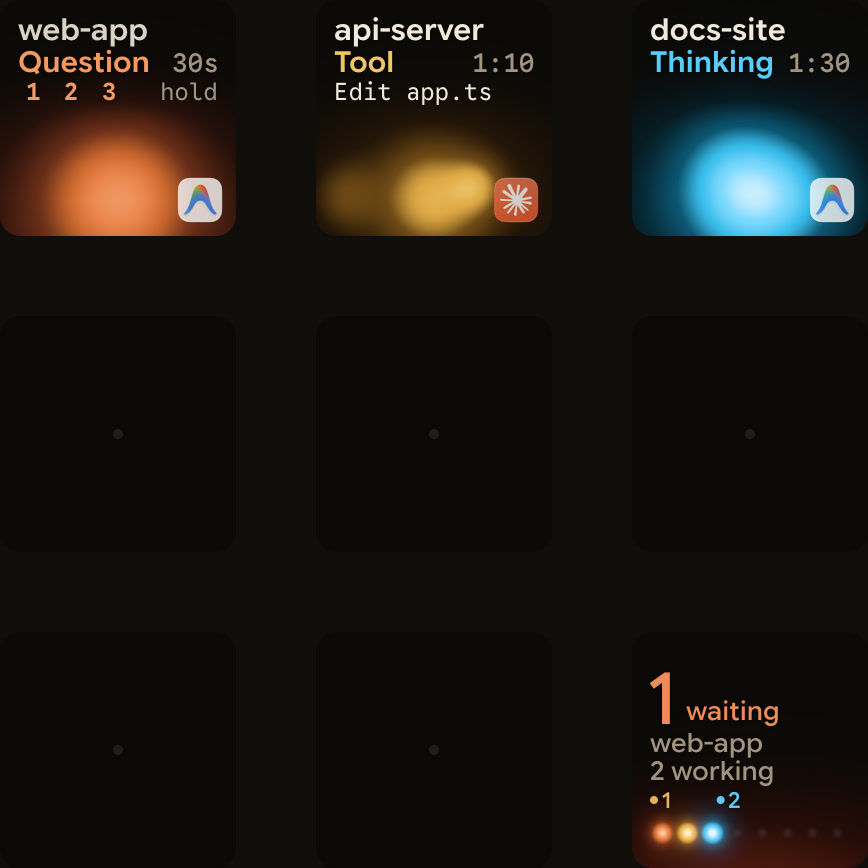
- Each Antigravity desktop app conversation gets its own key, with its title and state.
- Antigravity uses an azure blue working palette, and from Orbtile 0.3.4 its waiting states use the shared terracotta alarm colour.
- From Orbtile 0.2.10, replies also appear as live typewriter text.
- Waiting conversations move to the front.
- A tap on key 9 focuses the first waiting session, including sessions on other pages.
- A short press under 0.6 seconds on a session key opens that conversation on your computer.
- From Orbtile 0.2.6, keys for questions with numbered options show the numbers, such as
1 2 3 hold. - To answer, hold its key to open the question, then pick options on keys 1, 2, 3 and 7.
- Then hold
Sendon key 9 for 0.6 seconds, andSentmeans Antigravity acknowledged the reply. - This works for up to four questions with two to four choices each.
- Written answers, permission requests, remote sessions and unsupported questions stay on your computer.
Orbtile isn't tied to particular Antigravity versions. If an Antigravity update changes how the app talks to Orbtile, live text and keypad answers stop until Orbtile catches up. The conversations and their states keep showing, and you answer in Antigravity.
The same pad also shows Claude Code, Codex, ZCode and Kimi Code sessions, and your own tools through Orbtile's local Adapter API. See Antigravity notifications: CLI alerts and waiting agents and Google Antigravity IDE: editor, agents and permissions.
FAQ
What is the main difference between the Antigravity App and the Antigravity IDE?
The Antigravity App is a desktop command centre for managing several local agents in parallel across multi-folder Projects, workspaces and scheduled messages. The Antigravity IDE is a fully featured agentic IDE. Its agent works in an Agent side panel next to your files, with inline diffs and interactive implementation plans.
Can both the Antigravity App and the Antigravity IDE run on macOS, Windows, Linux and Googlebook?
Yes. The Antigravity App needs macOS 13 Ventura or later, while the standalone Antigravity IDE needs macOS 12 Monterey or later. Both run on Windows 10 64-bit or later, and on Linux or Googlebook with glibc 2.28 or later and glibcxx 3.4.25 or later.
Do I need the standalone Antigravity IDE to use Google Antigravity in an editor?
No. Besides the standalone Antigravity IDE from antigravity.google/download, Google offers Antigravity extensions for Visual Studio Code, IntelliJ-based JetBrains IDEs, Android Studio, Visual Studio 2026, Zed, Xcode and Eclipse. You do not need the Antigravity App to use the IDE or extensions.
Does Orbtile support both the Antigravity App and the Antigravity IDE?
No. Orbtile follows conversations in the Antigravity desktop app. It shows their title, state, live reply text and supported numbered-option questions on a Logitech MX Creative Keypad, an iPhone or an Android phone. Antigravity IDE and Antigravity CLI sessions do not appear automatically.